CyberDefenders: PhishStrike
A Medium Linux defensive lab focusing on threat intelligence analysis of a spoofed phishing email (194-PhishStrike.eml). Header and link inspection reveals SPF/DKIM authentication failures, multi-stage payload delivery links (CoinMiner, BitRAT, AsyncRAT), autorun registry persistence, an obfuscated PowerShell execution delay, and C2 infrastructure communicating over custom domains and Telegram bot exfiltration channels.
Executive Summary
An investigation into a high-value invoice phishing email (194-PhishStrike.eml) targeting institutional faculty revealed a spoofed attempt originating from unauthorized IP address 18.208.22.104 with failed SPF/DKIM authentications. Header and URL inspection confirmed the message embeds a link to 107.175.247.199 designed to deliver multi-stage payloads, including CoinMiner (which targets secondary payloads like (http://ripley.studio/loader/uploads/Qanjttrbv.jpeg)), BitRAT (Jzwvix.exe / SHA256: bf7628695c2df7a3020034a065397592a1f8850e59f9a448b555bc1c8c639539), and AsyncRAT. Behavioral analysis established that the malware establishes persistence via autorun registry modifications, executes a 50-second obfuscated PowerShell delay to evade sandbox detection, and communicates with C2 infrastructure (gh9st.mywire.org) and data exfiltration channels (bot5610920260). Immediate isolation of these Indicators of Compromise (IOCs) across network controls and email gateways is recommended to mitigate potential fraud and data theft.
Scenario
As a cybersecurity analyst at an educational institution, you receive an alert about a phishing email targeting faculty members. The email appears to be from a trusted contact and claims a $625,000 purchase, providing a link to download an invoice.
Your task is to investigate the email using Threat Intel tools. Analyze the email headers and inspect the link for malicious content. Identify any Indicators of Compromise (IOCs) and document your findings to prevent potential fraud and educate faculty on phishing recognition.
Provided Artifacts
194-PhishStrike.eml (SHA256: 19eaa4bc2d7ab6dcaa0dbeffd7d380569672c82e73cf184b05c42ace7273fe58)
Task 1
Question: Identifying the sender’s IP address with specific SPF and DKIM values helps trace the source of the phishing email. What is the sender’s IP address that has an SPF value of softfail and a DKIM value of fail?
The provided artifact is an email file. By checking its headers and searching for traces such as softfail or fail, we can find the sender’s IP mentioned in multiple headers:
$ cat 194-PhishStrike.eml | grep -E 'softfail|fail' -C 3
Received: from SJ0PR01MB7512.prod.exchangelabs.com (2603:10b6:a03:3d2::9) by
 DS7PR01MB7855.prod.exchangelabs.com with HTTPS;Thu, 9 Dec 2022 14:58:55
 +0000
ARC-Seal: i=2; a=rsa-sha256; s=arcselector9901; d=microsoft.com; cv=fail;
 b=duSdPQF6MkHA6NDKezdwwXo0cytNw6pKTyXfmDvi22cwiu15XbtSLWvmqSHiYcaOHDQNUg5f7tY+9JY/CEBHmaBO7E3lusTGIpLFNrNF7v4HyOwH2/XWf+JxNDSUM3TE24w0u8DhCnVy2lAoiH/iINzpcewzwrIQWVvKXkhk8UGbOf4SIgEJfiv9JrrQVPUql0wysWGU3gqoduOgIbFvpjyyGiS/Exd9ddgnfa0sS+83SRQg3jVmLEfSVcmg+9wvZfR6wFcX9Sga7efMqt6a9hT0q3ajrVBYuH+sY2El9UVvViZREf/FBYYkzJ8xO5oLFQanthp6EoFyN/DqNgO2Tw==
ARC-Message-Signature: i=2; a=rsa-sha256; c=relaxed/relaxed; d=microsoft.com;
 s=arcselector9901;
 h=From:Date:Subject:Message-ID:Content-Type:MIME-Version:X-MS-Exchange-AntiSpam-MessageData-ChunkCount:X-MS-Exchange-AntiSpam-MessageData-0:X-MS-Exchange-AntiSpam-MessageData-1;
 bh=AXBCwGkRxYZo4VpdXt4XQsGpZAHIDSpANJ7sP0OmP3M=;
 b=YV4rXtkEs8amVnLpcgziiiy3nO93s3HgMRy5SCHjk2Hw+yNPHRtJ2XWmWhSPI6W5aaIFstGBWpjyhE0u9A3vzC9r7ooUojm+hWE3Np2Kr2RyqtHrGzRQkzlGQ51vzG1U7jFokrXN0bUclFoXMlhZMvIoATxCZfj+TpT/zyoVxok1bxb1fyul8TWqqvPVFWO3lB38fuZ7QXcLCoc0GwVELhF8RfiHlEqiyS8u5emyOlJOSZBO1RniGFcZ+eDvGfM9bSui8daMiifi7VvoaMX0+ed6ajqa1zsBzWOD4BfGyVSgD5udi6wtnzcTKcqDJo9JyTfocwmCR8FIhINRFo0CcQ==
ARC-Authentication-Results: i=2; mx.microsoft.com 1; spf=softfail (sender ip
 is 18.208.22.104) smtp.rcpttodomain=fsfb.org.co smtp.mailfrom=uptc.edu.co;
 dmarc=none action=none header.from=uptc.edu.co; dkim=fail (no key for
 signature) header.d=uptc.edu.co; arc=fail (35)
Received: from BL1PR13CA0359.namprd13.prod.outlook.com (2603:10b6:208:2c6::34)
 by SJ0PR01MB7512.prod.exchangelabs.com (2603:10b6:a03:3d2::9) with Microsoft
 SMTP Server (version=TLS1_2, cipher=TLS_ECDHE_RSA_WITH_AES_256_GCM_SHA384) id
--
 (2603:10b6:208:2c6::34) with Microsoft SMTP Server (version=TLS1_2,
 cipher=TLS_ECDHE_RSA_WITH_AES_256_GCM_SHA384) id 15.20.7046.19 via Frontend
 Transport;Thu, 9 Dec 2022 14:58:43 +0000
Authentication-Results: spf=softfail (sender IP is 18.208.22.104)
 smtp.mailfrom=uptc.edu.co; dkim=fail (no key for signature)
 header.d=uptc.edu.co;dmarc=none action=none
 header.from=uptc.edu.co;compauth=softpass reason=201
Received-SPF: SoftFail (protection.outlook.com: domain of transitioning
Answer: 18.208.22.104
Task 2
Question: Understanding the return path of an email is essential for tracing its origin. What is the return path specified in this email?
This one is as easy as grepping for the return-path header:
$ cat 194-PhishStrike.eml | grep -i return-path
Return-Path: erikajohana.lopez@uptc.edu.co
Answer: erikajohana.lopez@uptc.edu.co
Task 3
Question: Identifying the source of malware is critical for effective threat mitigation and response. What is the IP address of the server hosting the malicious file related to malware distribution?
This details has to be mentioned somewhere in the body of the email, likely in an HTTP web address.
By checking the contents of the body and grepping for http, the following suspicious web address is identified:
$ cat 194-PhishStrike.eml | grep http
<http://107.175.247.199/loader/install.exe>
        <p><a href="http://107.175.247.199/loader/install.exe"
        <img src="https://upload.wikimedia.org/wikipedia/commons/thumb/a/a0/Logo_de_la_UPTC.svg/512px-Logo_de_la_UPTC.svg.png" alt="Signature Image">
Answer: 107.175.247.199
Task 4
Question: Identifying malware that exploits system resources for cryptocurrency mining is critical for prioritizing threat mitigation efforts. The malicious URL can deliver several malware types. Which malware family is responsible for cryptocurrency mining?
By searching for the identified address on URLhaus, multiple malware files are identified to be connected to this address, but on of them has a name that is clearly related to crypto mining and shows an identical web address to the one identified in the email:

Answer: CoinMiner
Task 5
Question: Identifying the specific URLs malware requests is key to disrupting its communication channels and reducing its impact. Based on the previous analysis of the cryptocurrency malware sample, what does this malware request the URL?
By checking the details of the Malware URL in URLhaus, we can get the exact SHA256 hash value of CoinMiner:
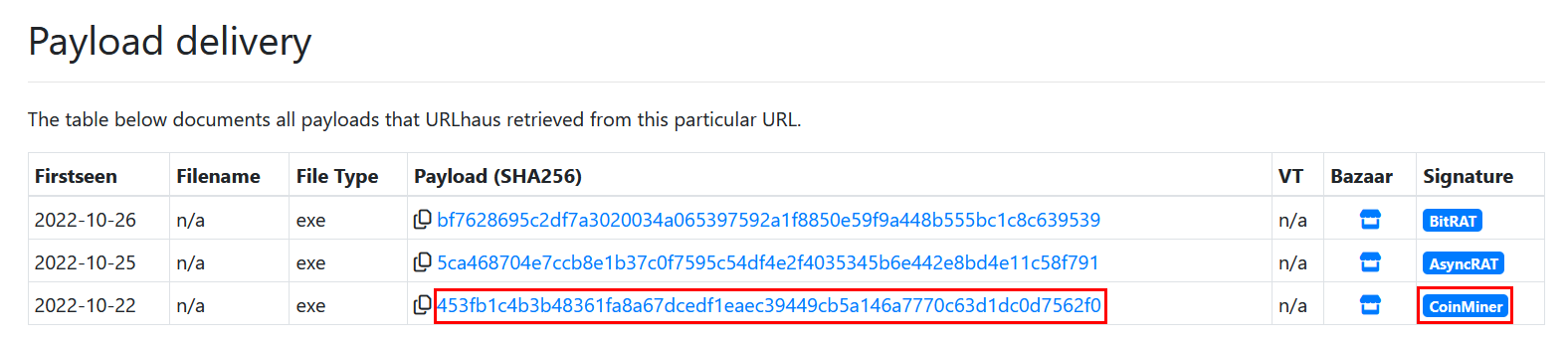
By searching for this hash on VirusTotal and checking the Relations tab, under the Contacted URLs section we can see the URLs contacted by the malware.
Two URLs are seen, one of which is a unique request to a suspicious domain and requesting a jpeg file that is likely just a disguise:
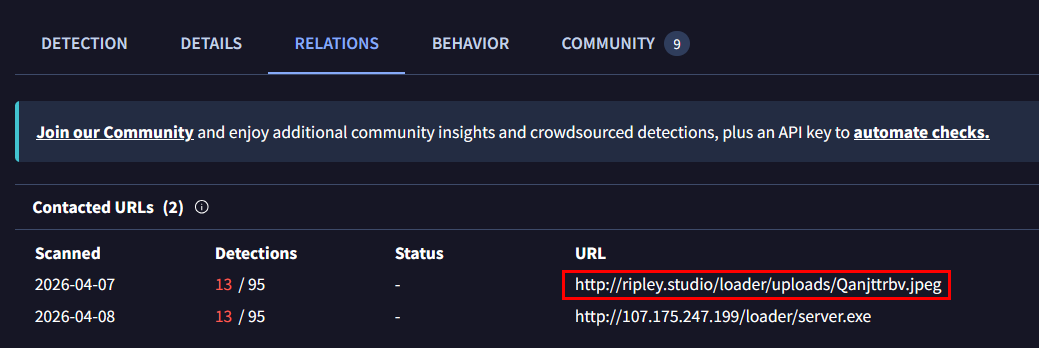
Answer: http://ripley.studio/loader/uploads/Qanjttrbv.jpeg
Task 6
Question: Understanding the registry entries added to the auto-run key by malware is crucial for identifying its persistence mechanisms. Based on the BitRAT malware sample analysis, what is the executable’s name in the first value added to the registry auto-run key?
By taking the SHA256 hash of the BitRAT malware identified in Figure 2 and submitting it to VirusTotal, we can identify Registry modification patterns in the Behavior tab under the “Registry keys set” section.
By searching for keys cotaining autorun/run, we can identify the following suspicious key pointing to a suspicious executable file:
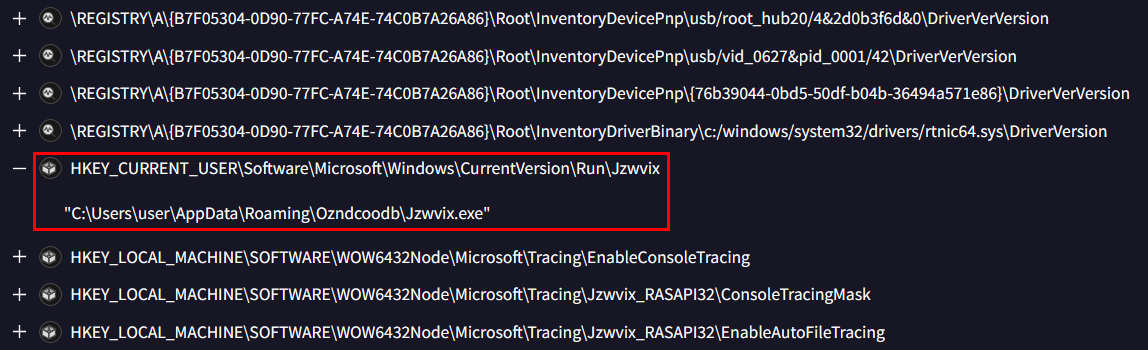
Answer: Jzwvix.exe
Task 7
Question: Identifying the SHA-256 hash of files downloaded from a malicious URL is essential for tracking and analyzing malware activity. Based on the BitRAT analysis, what is the SHA-256 hash of the file previously downloaded and added to the autorun keys?
Under the Details tab and in the Names section, we can discover that the BitRAT malware that was identified in URLhaus is the same as the executable file identified in the previous question:
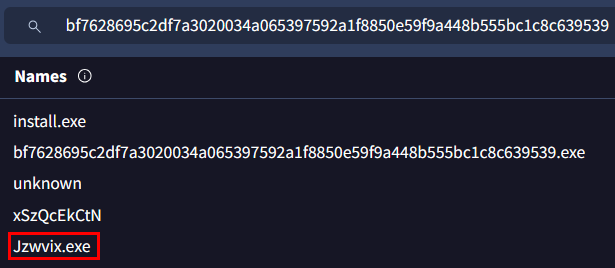
This means that they share the same SHA256 hash.
Answer: bf7628695c2df7a3020034a065397592a1f8850e59f9a448b555bc1c8c639539
Task 8
Question: Analyzing the HTTP requests made by malware helps in identifying its communication patterns. What is the URL in the HTTP request used by the loader to retrieve the BitRAT malware?
As seen in Figure 3, the malware contacts two URLs, and the second is likely the one used by the loader.
Answer: http://107.175.247.199/loader/server.exe
Task 9
Question: Introducing a delay in malware execution can help evade detection mechanisms. What is the delay (in seconds) caused by the PowerShell command according to the BitRAT analysis?
Let’s check out the PowerShell command ran by the malware, under the Behavior tab in the “Crowdsourced Sigma Rules” section, where Sigma rules identified PowerShell indicators in the malware:
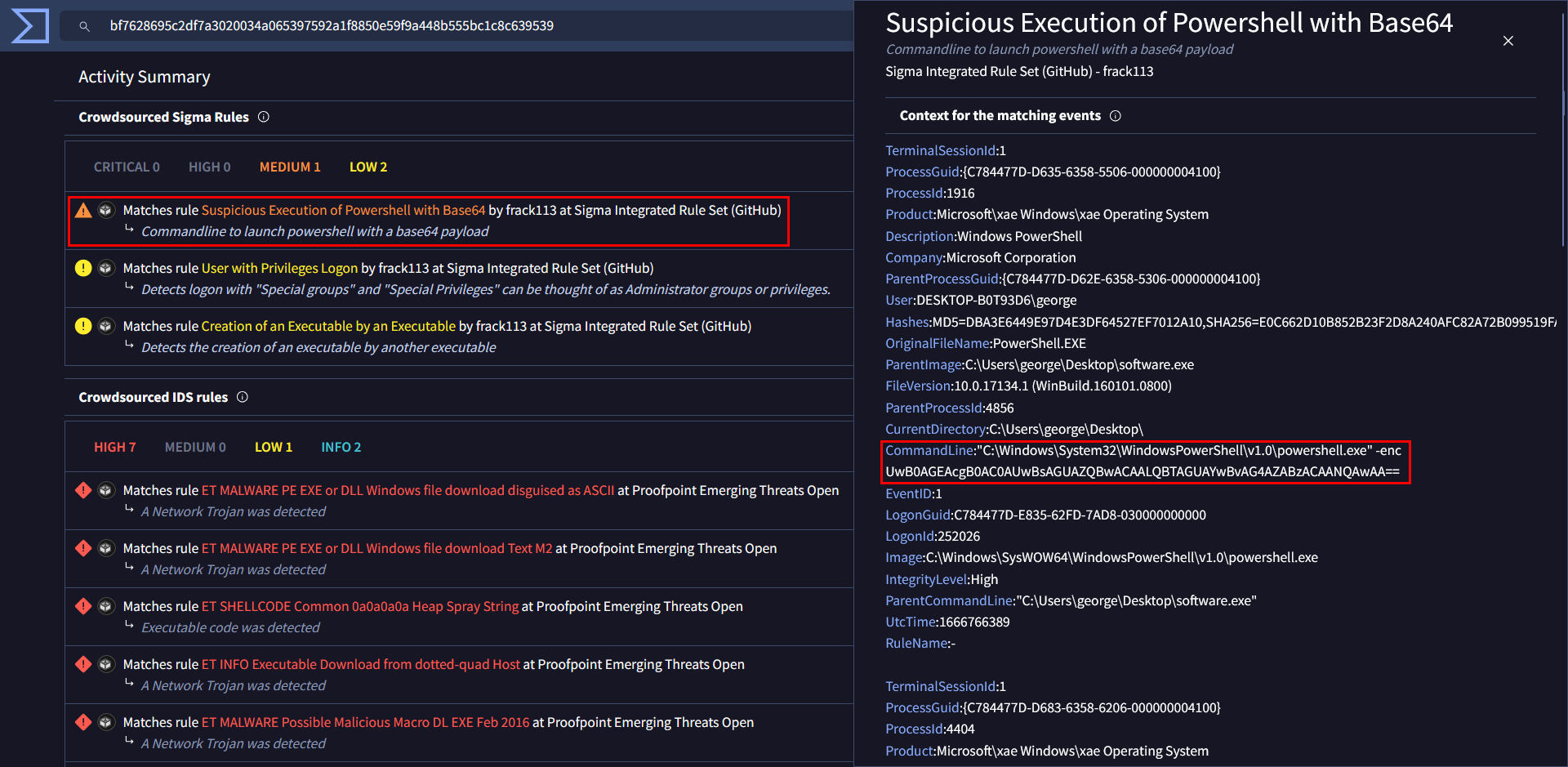
By decoding the Base64 text in CyberChef, we get the following:
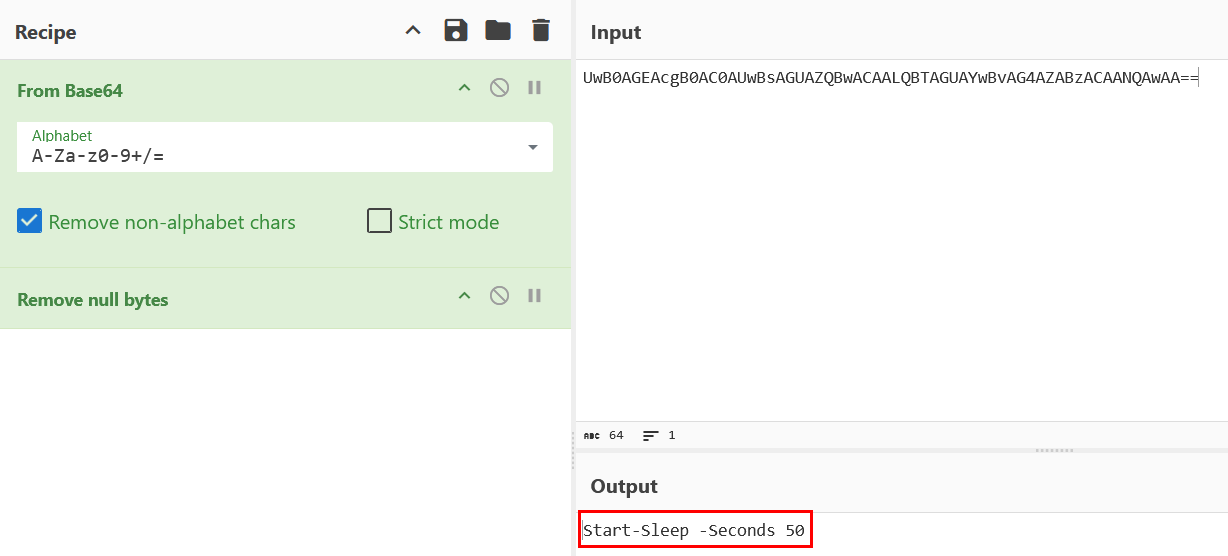
Answer: 50
Task 10
Question: Tracking the command and control (C2) domains used by malware is essential for detecting and blocking malicious activities. What is the C2 domain used by the BitRAT malware?
By checking the Community tab for users’ discussions about the malware, we can identify that one user mentioned the exact C2 domain used by this malware:
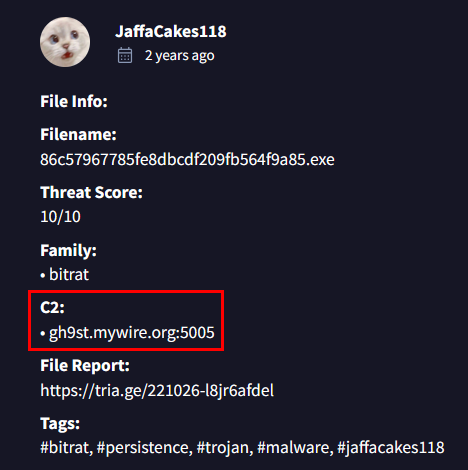
Answer: gh9st.mywire.org
Task 11
Question: Understanding how malware exfiltrates data is essential for detecting and preventing data breaches. According to the AsyncRAT analysis, what is the Telegram Bot ID used by this malware?
By searching online for comprehensive reports that uncover the details of AsyncRAT (using its SHA256 hash taken from Figure 2 as searching term), this report by tria.ge is identified, and it mentions the exact Telegram requests made by the malware under the Network section, from which we can identify the Telegram Bot ID used by the malware:
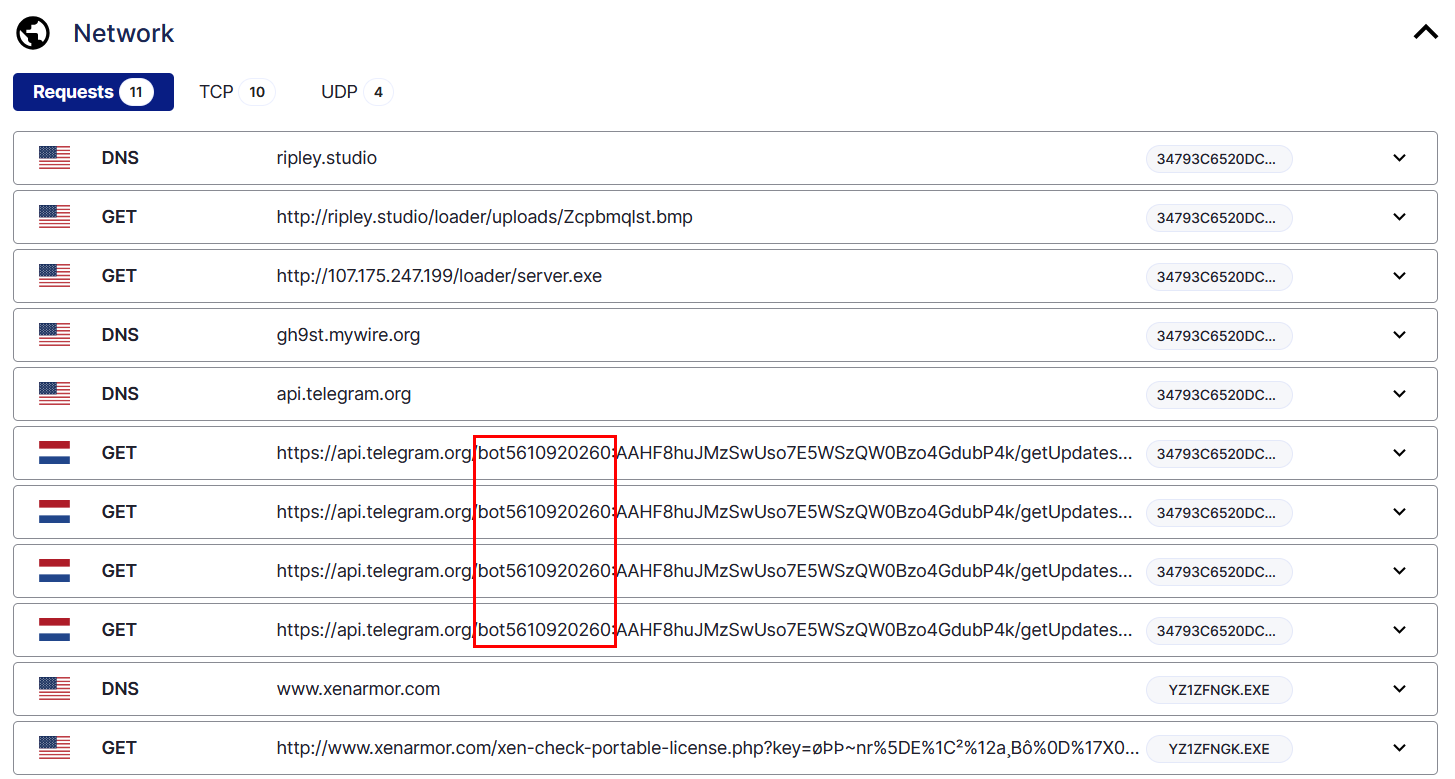
Answer: bot5610920260
Business Impact
Confidentiality
- High Impact: BitRAT and AsyncRAT enable unauthorized remote access, keylogging, and sensitive data exfiltration (credentials, financial records) to external C2 infrastructure (
gh9st.mywire.org) and Telegram (bot5610920260).
Integrity
- High Impact: System integrity is compromised through persistence mechanisms (autorun registry keys pointing to
Jzwvix.exe). The $625,000 invoice lure poses a direct risk of financial transaction fraud.
Availability
- Moderate to High Impact: CoinMiner degrades endpoint performance by hijacking hardware resources, risking operational slowdowns, system instability, and potential ransomware deployment.
Remediation
- Network Blocking: Ingest IOCs (
107.175.247.199,gh9st.mywire.org, payload URLs) into perimeter firewalls and SEGs to block C2 and malicious traffic. - Endpoint Containment: Query EDR/SIEM for hash
bf7628695c2df7a3020034a065397592a1f8850e59f9a448b555bc1c8c639539orJzwvix.exepersistence, and immediately isolate affected hosts. - Credential Resets: Enforce mandatory password resets and terminate active sessions for affected faculty or targeted sender accounts.
- Email Enforcement: Enforce strict DMARC policies (
quarantine/reject) to automatically drop emails failing SPF/DKIM checks from spoofed senders. - Awareness Alert: Notify faculty of the $625,000 invoice phishing campaign and remind them to verify external payment links.